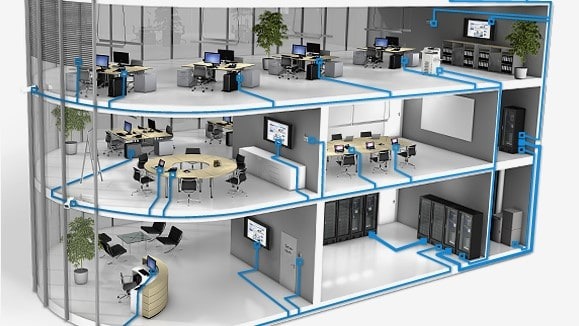
When it comes to networking, not all Ethernet cables are created equal. Whether you’re wiring a small office or upgrading your home network, the type of cable you choose determines how fast and reliable your connection will be.
At Microsys, we often get asked: What’s the real difference between Cat5e, Cat6, Cat7, and Cat8 cables — and which one should I use?
Let’s break it down simply and clearly.
“Cat” stands for Category, and each number (5e, 6, 7, 8) represents a performance standard defined by the Telecommunications Industry Association (TIA).
As the category number increases, so do speed, bandwidth, and signal quality.
Cat5e (Category 5 Enhanced) replaced older Cat5 cables and remains common in residential and small business networks. It supports Gigabit Ethernet and is great for general web browsing, video streaming, and small office LANs.
Microsys Tip: If you already have Cat5e installed, it’s still perfectly fine for most home users – but upgrading may be worth it for higher network loads or future-proofing.
Cat6 cables use tighter twists and improved insulation to reduce crosstalk and electromagnetic interference (EMI). They’re ideal for environments with high data usage – such as offices, gaming setups, or small data networks.
Microsys Tip: Cat6 is often the sweet spot, affordable, reliable, and compatible with most networking equipment.
Cat7 cables feature individual shielding around each pair of wires, reducing interference to almost zero. This makes them suitable for server rooms, high-performance workstations, and environments with heavy electrical noise.
Microsys Tip: While Cat7 offers great performance, its connectors are less common – so it’s mainly used in specialized or professional setups.
Cat8 is designed for data centers and enterprise-grade networks. It supports ultra-high speeds over short distances and is backward compatible with previous categories. However, it’s overkill for most home users.
Microsys Tip: Cat8 is ideal if you’re building a new server rack or upgrading core infrastructure – but for typical networking, Cat6 or Cat6a provides more than enough performance.
| Category | Max Speed | Bandwidth | Shielding | Best Use Case |
|---|---|---|---|---|
|
Cat5e |
1 Gbps |
100 MHz |
Optional |
Home / Office Basics |
|
Cat6 |
10 Gbps (short runs) |
250 MHz |
Optional |
Small Business / Gaming |
|
Cat7 |
10 Gbps |
600 MHz |
Shielded |
Enterprise / Server Rooms |
|
Cat8 |
40 Gbps |
2000 MHz |
Shielded |
Data Centers / High-End Labs |
No matter which cable you choose, proper wiring is key to performance.
Ethernet cables use 8 color-coded wires, arranged in pairs. The two common standards are T568A and T568B.
Both perform identically, the only difference is how the color pairs are ordered inside the RJ45 connector.
It’s important to use the same standard on both ends of a cable for a straight-through connection.
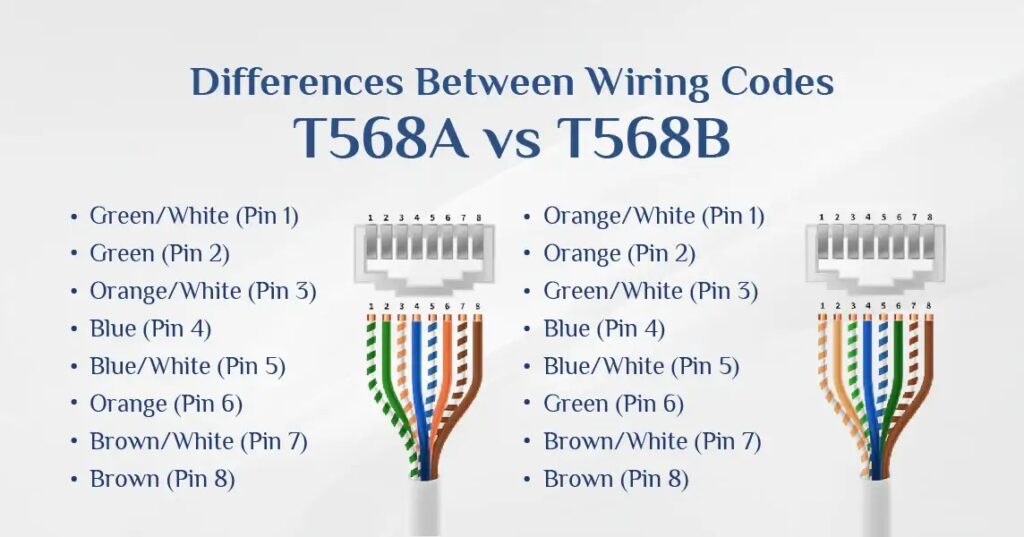
This configuration is used for connecting similar devices, such as two computers or two switches, directly without an intermediary device (like a router). In a crossover cable, one end is wired using the T568A standard, and the other end uses the T568B standard. This arrangement ensures that the transmit and receive wires are “crossed” so that the transmitting pins on one end connect to the receiving pins on the other, facilitating communication between the two devices.
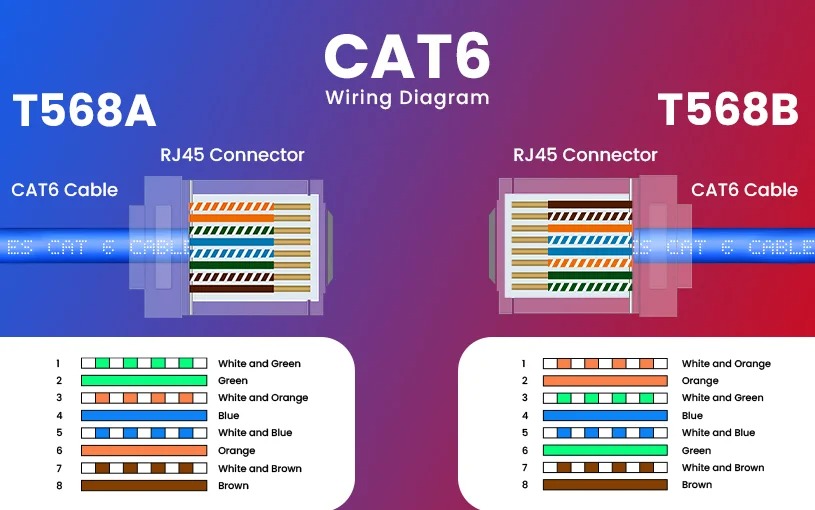
When deciding between RJ45 Color Code A or B, the choice largely depends on compatibility with existing infrastructure and regional preferences. T568A is often used in environments that require backward compatibility with older systems, such as legacy telephone networks or government installations, commonly seen in Europe and the Pacific region. It is the preferred choice when projects involve older systems or require federal compliance due to its backward compatibility with older telecom systems.
On the other hand, T568B is more widely adopted in modern commercial and residential networks, aligning better with contemporary equipment and making it the default standard in most telecom installations, particularly in the United States.
For most setups, consistency is crucial. If you’re expanding an existing network, it’s best to stick with the current wiring standard. However, for new installations, T568B is often recommended due to its widespread use and better alignment with modern systems. Lastly, keep in mind that for straight-through cables, use the same standard at both ends, while for crossover cables, mix T568A and T568B to ensure proper data transmission.
Have a question or need IT support? Reach out to our team, we’re ready to help you with reliable, fast, and personalized service.
© 2018 – Microsys Computer Solutions, LLC